Joan Website | Joan Bio | Joan Licensing Info | Joan Contact Info | Blog Main Page

Art Licensing by artist Joan Beiriger: I'm happy to share art licensing info but please
give me credit and link to my blog when using it on your site. Thanks.

Friday, October 30, 2009

Art Collection & Mockup Examples

Pictured below are more examples of art collections that art director Joanne Fink of Lakeside Design has generously shared of artist Mary Gartner's Snow Flurry, Sweet Easter, and Valentine art collections. These collections illustrate that collections can be successful collections even if they are composed of a limited number of some elements (central images, patterns, borders, icons). For instance, the Snow Flurry and Valentine collections each have MANY central images but the Sweet Easter collection only has one. Yet, the Sweet Easter collection is still a successful collection because it has many icons related to the central image that can be used for patterns and borders. The Snow Flurry collection doesn't have many borders but because it has many central figures, more borders can be created if needed. Learn more about art collections by reading "What are Art Collections and Why Create Them?" To see more collections and product mock-ups, go to the "Art Collections / Mockups" section of this blog.

Wednesday, October 28, 2009

Can an Artist be Successful in Licensing Multiple Art Styles?

I've often questioned the possibility of successfully licensing art when the artist has several styles. Some art licensing experts recommend that when the artist first starts out they can try licensing different styles and then choose the one that clicks with the consumer and discontinue the ones that do not work. Other experts recommend that the artist should choose one style from the beginning and stick with it no matter what. But what about licensing multiple art styles at the same time? Read the following comments from art agent Suzanne Cruise.


Licensing Multiple Art Styles
by Suzanne Cruise

I have seen a lot of portfolios over the years, many of them from artists who offer different styles. Most of the time I find that very few artists have SOLID multiple styles. My artist Sandi Gore Evans was one of the fortunate ones. She did those wonderful whimsical characters and then then she created those beautiful (almost botanical) florals. People are often shocked when they learn that the work was done by one artist.

What gave her work away (that the same artist created both styles) was her color palette. Sandi only used six colors of paint so all her work had a similar feel when the styles were viewed next to each other.

Many artists think that they are strong in 2-3-4 styles but realistically they are not. If an artist is truly blessed, then I would say devote time to all the styles and go for it. But artists need to be brutally honest with themselves about their work, and many are not . . . or cannot be. As human nature has it, it is quite difficult to be unbiased about what we do, especially when artists are first starting out. This is where a creative "sounding board " is critical. Ask a person in the business who you trust implicitly, what do they think of all your styles. Then take to heart what they say without getting your feelings hurt. It is a total waste of your creative time to fall in love with a style that you do not do well.

Whether you are really top notch at more than one style or only great at one, always ask yourself how you feel about your work and what part of yourself you are putting into it while you are creating it. If you are painting from your heart, this just shines thru and the art "sings from the page." Many times those artists that paint from their hearts have a leg-up in getting their art licensed as often times, the consumer "connects" with that energy. Work with this "on the page" excitement because it has some innate ability to capture the consumer's attention.

Monday, October 26, 2009

Resource: Facebook - not Just for Individuals

Facebook is not only being used by individuals to keep in touch with family and friends or artists to market their art. It is also used by companies and manufacturers including some that license art. Companies have discovered that keeping in touch with their customers, finding out what they want, and listening & responding to their complaints are ways to create consumer confidence and loyalty. Not only do manufacturers like Harley-Davidson Motor Company and chain stores like Sears have facebook pages but so do manufacturers that license art such as C.R. Gibson, Yankee Candle Company, and Clothworks fabrics. You might ask, "So what?" Well, by reading their pages you will discover new product introductions, consumer response to new products, learn consumer concerns and you can even leave your own comments on their walls. This is a terrific way to learn consumers needs and art trends that can help you to license your art.

When you are in the "Pages" area of facebook, enter a company name in the search window to see if they have a facebook page or enter keywords. For instance, if you search for the word "fabrics," a list of over 200 companies pops-up. Some of them are artists, some retail stores (Hancock Fabrics, Beverly fabrics), and some manufacturers. Hint: It is easier finding manufacturers if you look at only the "Product" and "Other Business" Type as you scan the list.

You must belong to facebook (free) to search for manufacturer pages.

Friday, October 23, 2009

Photoshop Tip: Mockups - A Simple Method to Create Realistic Bedroom Linens & Curtains

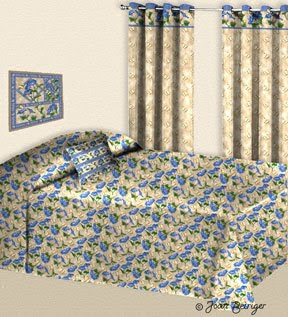
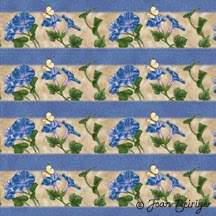
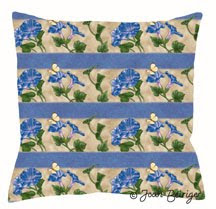
If you want to WOW manufacturers and really showcase your art with mock-ups for bedroom linens and curtains, you can easily do it in Photoshop. The key is to use templates that have realistic shading and then blending the art (pattern) layer with the template layer by using Photoshop's layer modes. The curtain, bedspread, and pillow example at the left was created by using this technique. The most time consuming part of the process is creating the templates. I made mine by taking pictures of actual products, simplifying them (removed patterns and backgrounds) and converting them to gray scale in Photoshop. Spending the time to create templates is worth the effort because they can be used over and over again. This tutorial shows how to create a pillow mock-up with one of my morning glory patterns.

Warning: If product mock-ups are too realistic looking,manufacturers may think that the art on them have already been licensed. To avoid confusion, I recommend that you use signage stating that the art is available for licensing.

1. Create a shaded pillow template by either taking a picture of a generic pillow or drawing & shading one. Then open Photoshop and place the pillow template on a layer.


2. Place the art (pattern) in a separate layer above the pillow template layer. Move and/or resize the pattern so that it covers the pillow template.
3. Go to the pillow template layer and select the outside of the pillow with the magic wand tool (Mac & Windows = W).


4. Go to the pattern layer and hit the delete key. The pattern is now in the shape of the pillow.
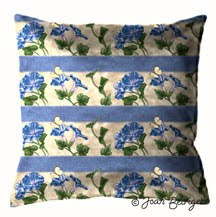


5. Select the multiply mode by pulling down the pop-up menu at the top of the layers pallet. Voila! You now have a realistic looking pillow. Simple isn't it?

Note: If the pillow is too dark, merge the two layers together, and use the Curves Tool (Mac = Command + M; Windows = Ctrl + M) to lighten it.